

 Fully integrated Functions

Tenant, Environment and Company Here's how to Easily
tell the Difference between
the Terms related to Business Central
tell the
the Terms
The terms “tenant,” “environment,” and “company” are often confused when discussing Microsoft Dynamics 365 Business Central (Online). However, they describe different levels of the system. In this article, we’ll explain how to tell them apart, show how the terms are related, and highlight what you should keep in mind in practice.
Tenant, Environment, and Company: What These Terms mean
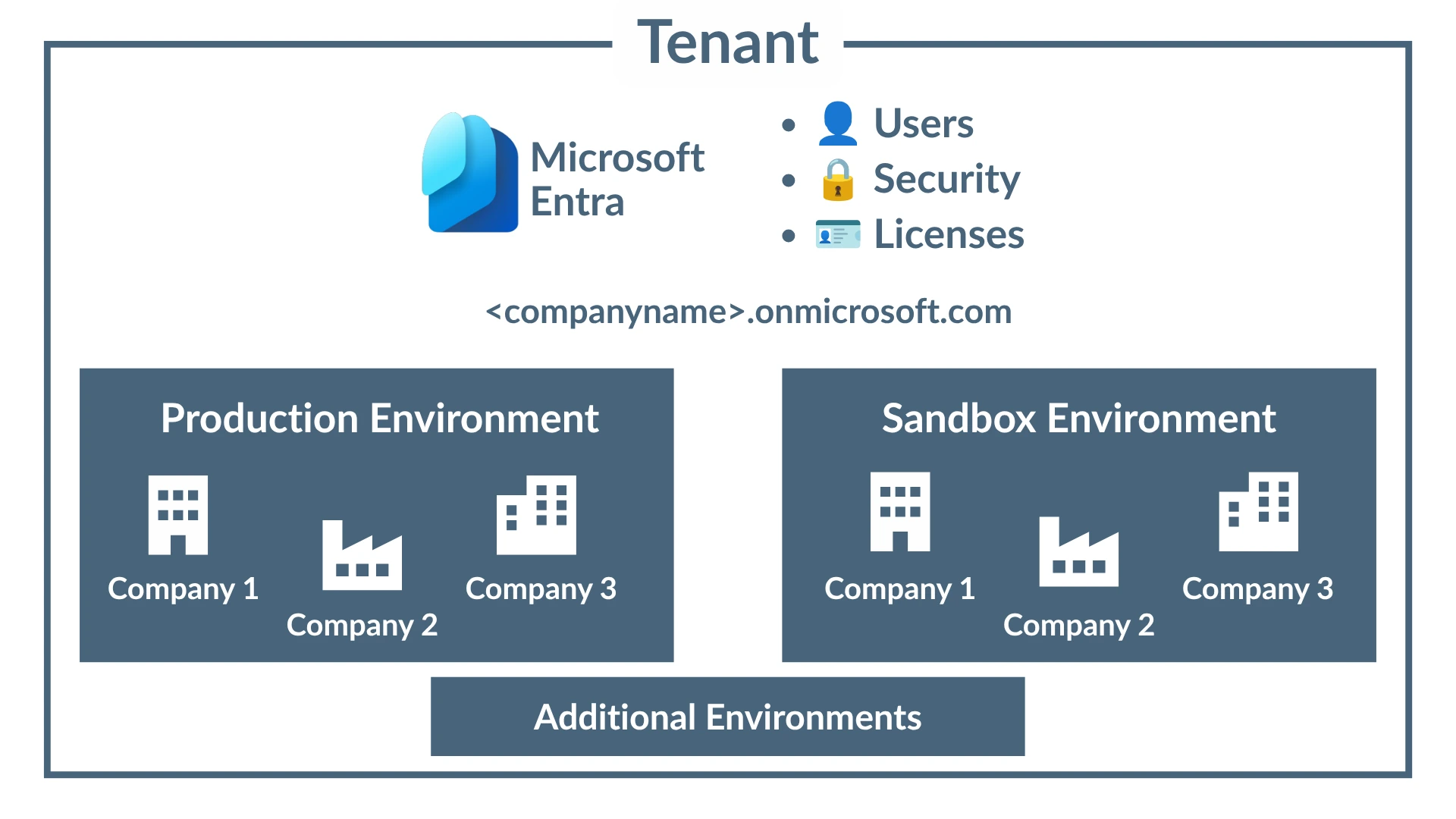
As the top-level unit, the tenant encompasses an organization’s entire Microsoft cloud organization. This includes not only Dynamics 365 Business Central, but also Microsoft 365, including all applications.
The tenant is uniquely identified via Microsoft Entra ID (formerly Azure Active Directory). User accounts, authentication, security policies, and licenses are managed at the tenant level and are then made available to the individual Microsoft services (including Business Central). As a result, the tenant serves as the common foundation for all of a company’s Microsoft cloud applications.
The tenant’s most important security features include multi-factor authentication (MFA), conditional access, and role-based access control (RBAC). These features ensure that only authorized individuals can access company data and applications.
Each tenant receives a standard domain <companyname>.onmicrosoft.com. Personalized email addresses can be created using your own email domains.
As a rule, each company has exactly one tenant. However, in most cases, multiple environments are operated within that tenant.
Environment
The environment is contained within the tenant. Environments can be updated, backed up, and managed independently of one another. Each environment has its own database and a separate configuration. It is always tied to a specific country and a specific localization.
A distinction is made between production environments and test environments (sandboxes). Sandbox environments are used, for example, to test new features or train users without affecting production data.
Permissions can also be granted at the environment level, so individual users do not necessarily need to have access to every environment within a tenant.
By default, Business Central provides one production environment and three sandbox environments for each tenant (for the Premium or Essentials license types). If this is not sufficient - for example, due to more complex ERP scenarios or international corporate structures - you can purchase additional environments. Microsoft provides the Additional Environment Add-On for this purpose. It includes one additional production environment, three additional sandbox environments, and 4GB of additional storage capacity for your entire tenant. The maximum database size for an environment is 3TB.
Technical resources such as background sessions and queries are also primarily subject to limitations at the environment level. For example, a maximum of ten background sessions can run in parallel per environment. Additional sessions are placed in a queue (max. 100).
An environment can contain up to 300 companies.
Company
A company represents the business or operational level within an environment. It has its own business data, such as accounts receivable, accounts payable, items, journal entries, and master data.
Example
Production Environment
• Company: Muster GmbH
• Company: Muster AG
• Company: Muster Verwaltung GmbH
All three companies operate in the same production environment with the same extensions and the same version of Business Central. However, each company has its own accounting data and master data. In addition, there could be a second sandbox environment that also contains these three companies. Updates or new features could be tested there without affecting the production data.
Working with multiple companies within a single environment is particularly useful for corporate groups with several legally independent companies or for companies that wish to manage different company codes separately. Although the companies share the same technical infrastructure, their business data remains completely separate from one another.
Provided they have the appropriate permissions, users can switch between the individual companies within an environment without having to log in again.
The Structural Organization
Example
flowchart TD
    A["Tenant"]

    A --> B["Production Environment"]
    A --> C["Sandbox Environment"]
    A --> D["Additional Environments"]

    B --> B1["Company Muster GmbH"]
    B --> B2["Company Muster AG"]
    B --> B3["Company Muster Verwaltung GmbH"]

    C --> C1["Test Company Muster GmbH"]
    C --> C2["Test Company Muster AG"]
It is important to note that a user first logs in to the tenant, then works in a specific environment, and finally within a selected company. This hierarchy forms the basic structure of Business Central.
Clearly distinguishing these Concepts helps with the Management and Efficient Use of Business Central
- Tenant: the entire Microsoft cloud organization
- Environment: a standalone Business Central instance with its own database
- Company: a legal entity or a business unit within an environment
Even though the terms “tenant,” “environment,” and “company” are often mistakenly used interchangeably in practice, they describe different levels within Microsoft Dynamics 365 Business Central. While the tenant forms the foundation of the entire Microsoft cloud organization, environments serve to technically separate production and test systems. Finally, the companies constitute the business management level where the actual company data is managed.
Understanding these different levels makes it easier for you to manage Business Central, helps with planning permissions and system landscapes, and enables you to leverage the platform’s capabilities in a targeted and efficient manner.
